The LegioLog legionella sensor
A wireless temperature sensor on your water pipe
Two probes, a red one on the hot pipe and a white one on the cold. The sensor measures every 15 minutes, day and night, and puts everything in your legionella logbook. You place it yourself, without an installer and without cables through the building.
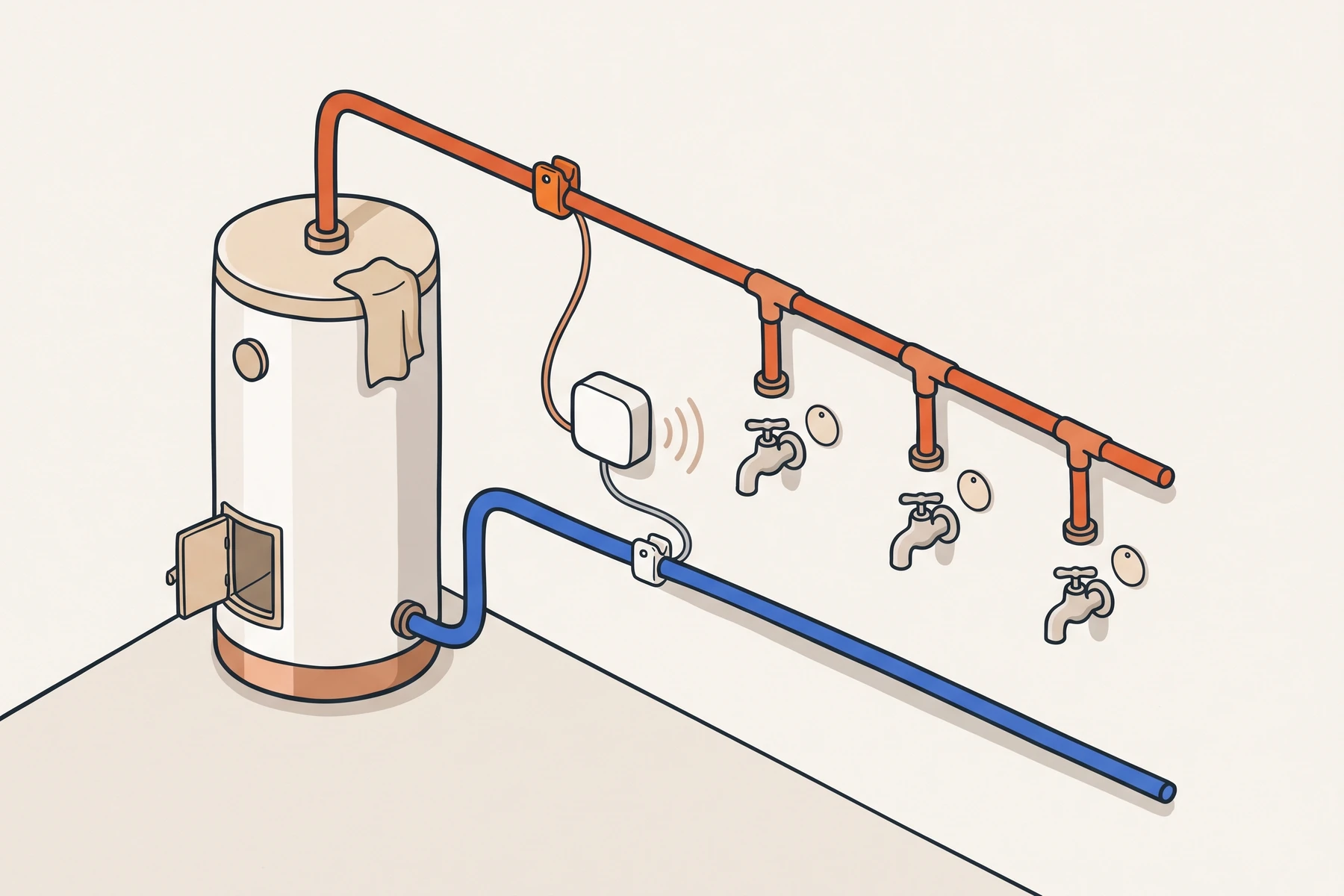
- Red probe on the hot pipe, at least 2 m from the water heater and before the first branch
- White probe on the cold supply
- Sensor transmits wirelessly, runs on a battery
- Tag at every tap: a tap records the flush
- 15 min
- between two readings, day and night
- 2
- probes per sensor, hot and cold
- 0
- cables through the building, wireless
What is in the box
Sensor, gateway and tags
A kit has three parts. Together they keep your logbook without anyone having to copy anything out.
The sensor
A small box with two probes on a cable: the red one on the hot pipe, the white one on the cold. It runs on a battery and transmits over LoRaWAN, a radio that goes through walls.
The gateway
The box at reception or in the meter cupboard. It picks up the readings of all sensors and sends them to the app, over a network cable to your router or over wifi.
The tags
Small round stickers on the tile at every tap in the flushing round. Whoever flushes holds their phone against it; that records the flush with time, name and flushing time.
Where the sensor goes
On the pipe leaving the water heater, before the first branch
The red probe goes on the hot pipe coming out of the water heater, before the first branch and at least two metres from the heater, and not on a bend. That way it sees hot water pass as soon as a tap opens anywhere in the building.
The white probe goes on the cold supply. Mounting paste and an insulation sleeve go over both probes, so the sensor measures the pipe and not the air around it.
One sensor per hot water installation is enough. After placing it, the app checks with the placement check that the red probe is in the right place: you open a hot tap and the app watches.
Tick off while mounting
- Red probe on the hot pipe leaving the water heater
- Before the first branch, at least two metres from the water heater
- On a straight section of pipe, not on a bend
- White probe on the cold supply
- Mounting paste and an insulation sleeve over both probes
- Placement check done in the app
What the sensor monitors
Four things, all day long
- 1
Hot water that cools down
A circulation pipe should stay at 60 degrees. If it drops below that, you get an alert.
- 2
Cold water that warms up
Cold water should stay below 25 degrees. If it goes above that, you get an alert.
- 3
Whether hot water came when flushing
After a flushing round the app checks whether the pipe jumped by at least 10 degrees, or reached the temperature of the installation (55 degrees at a flushing point). That way you see for each round whether hot water really came out of the installation.
- 4
Whether the sensor itself still reports
If the gateway does not hear a sensor for a while, or the battery runs low, you get an alert about that too.
An alert only follows after 3 readings outside the norm in a row. A tap that runs cold for a moment does not give a false alert.
Measuring rhythm and alerts
A reading every 15 minutes
The sensor measures every 15 minutes, also at night and at the weekend. That rhythm is the basis: the logbook rests on it and the app calculates with it.
If a temperature goes outside the limit, the sensor also sends an extra message. A deviation is detected within the measuring interval, usually within a few minutes.
The alert arrives in the app and by email to the managers of that site. In the app you record what you did about it; that goes into the report.
With a circulation pipe
In an installation with circulation the hot water always flows round. The sensor then monitors the loop: if it stays at 60 degrees, that is in the logbook. A tap at a tap records the flush, but on such a pipe it gives no evidence per tap; the logbook says so honestly.
Your hot water supply
Water heater, combi boiler or heat pump
The sensor works with any hot water installation. For a few types we first agree the sensor position with you.
Storage water heater
The usual situation. The red probe goes on the hot pipe leaving the heater, before the first branch.
Combi boiler or district heating
There is no stored hot water, so the measuring point differs per installation. We call you before shipping to decide the spot together.
Heat pump
A heat pump is often set lower than 55 degrees. We then calculate with the temperature you set, minus 3 degrees and never lower than 50. If the sensor sees the heating programme, that goes into the logbook. Here too we call you before shipping.
Range
No wifi needed at the taps
The sensors transmit over LoRaWAN to the gateway. That signal goes through walls and between buildings, so you need no wifi or socket at the water heater.
The gateway itself needs power and internet: a network cable to your router (the most reliable) or wifi on 2.4 GHz.
A large or spread-out site gets two gateways with kit L. An extra gateway costs €129 one-off.
Practical
What else you want to know
Battery
The sensor runs on a battery. The app shows how full it is and warns you when the battery is low.
The first 48 hours
After placing, the installation is in learning mode for two days. Probes go on and off and taps run; alerts are recorded, but you do not get an email about them yet.
Placing it yourself
No installer, no cables through the building. A screwdriver, mounting paste, sleeves and clamps are in the box. On average you are done in half an hour.
CE and conformity
The sensor and the gateway are radio equipment made by Dragino (D22-LB and LPS8N). The EU declarations of conformity are on our site.
What it costs
The sensor is part of the kit
- Kit S from €395 one-off, with a subscription from €39 per month.
- The size follows the number of buildings and hot water installations.
- Prefer to rent? Ask us.
Amounts exclude VAT.
All pricesSee how it works?
Read how it works step by step, or ask us for a pilot or a call. We work out the kit size and the price with you.